Mindmap AI Review: An AI-First Mind Map Maker for iPhone
A hands-on look at Mindmap AI — what it does well, where it falls short, and who it's for. AI-built maps from a topic, URL, or text, plus outline view and export.
Mindmap AI is a mind map maker for iPhone with one clear thesis: you should never start from a blank canvas. Type a topic, paste an article, or drop a URL and it builds a complete, organized map in seconds — then you shape it. Full disclosure: it's ours, so this isn't a neutral third-party verdict. What it is is an honest walkthrough of exactly what the app does, where it's strong, and where it isn't the right tool.
The core idea: maps that start already built
Most mind map apps hand you an empty node and a blinking cursor. That's fine if you already know your structure, and paralyzing if you don't. Mindmap AI inverts it. You describe what you want mapped, and the AI produces the first full draft — central topic, main branches, nested sub-points — so your work becomes editing rather than inventing from nothing.
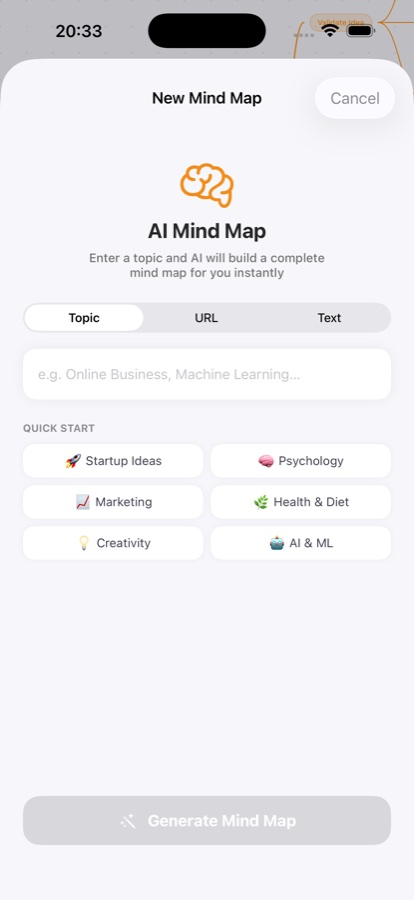
There are three input modes on the new-map screen, and the distinction matters in practice:
- Topic — type something like "Machine Learning" or "Launch a Startup" and get a map built from the model's general knowledge. Quick-start chips (Startup Ideas, Psychology, Marketing, Health & Diet, Creativity, AI & ML) are there for when you just want to see it work.
- URL — paste a public article link and it reads the page and maps its structure. This is the standout mode for turning reading into notes; there's a full walkthrough in how to turn an article into a mind map.
- Text — paste raw text (a newsletter, a PDF excerpt, lecture notes) when the content is behind a login or not on the web. The AI maps exactly what you give it.
The canvas: organized, color-coded, infinite
Generated maps land on an infinite, dot-grid canvas you can pinch to zoom and drag to pan. Branches fan out bidirectionally — left and right of the center — each in its own color, with edges that connect to the node's edge rather than crossing through it. It reads as a genuine map, not a cramped tree.
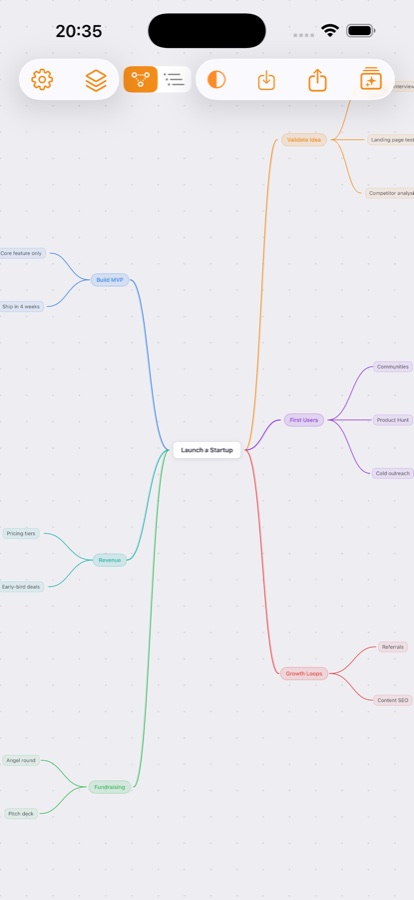
Every node is editable. Select one and an action strip lets you add a child, edit the text, delete it, or — the part that makes this more than a diagram tool — expand it with AI. Tap expand and the model fans out fresh sub-ideas beneath that node. You can also ask the AI to explain a concept, and the explanation attaches to the map as a note, so you don't tab out to a search engine mid-thought. Maps auto-save as you work.
Outline view: the feature that earns its keep
A toggle in the toolbar flips the same map into an outline — a clean, collapsible list where each branch shows how many ideas sit under it. This is where the app stops being a pretty picture and becomes useful for studying and writing.
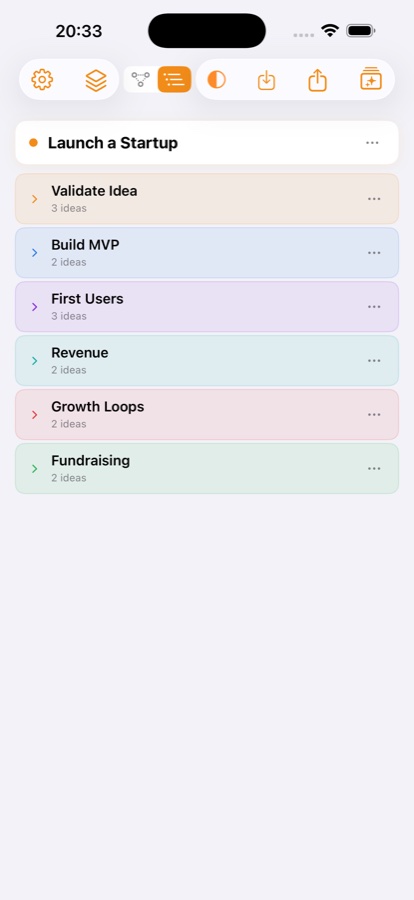
Because a map and its outline are the same document, collapsing a branch and recalling what's under it before you expand it is a built-in self-quiz — the retrieval practice that actually moves things into memory. If you study, the exam-focused version of this loop is in how to study with mind maps, and the outline-vs-map trade-off is covered in mind map vs outline.
Library, sync, and dark mode
Maps save to a library with previews and sync to your account, so a map you built on your commute is there later on the same signed-in device set. Sign-in is via Sign in with Apple. The whole app adapts to light and dark mode. These are the quiet, expected things — they're here and they work, which is the most you want to notice about them.
Export (Pro): PDF outlines and JSON
On the Pro tier you can export a map as a multi-page PDF outline — useful for handing structure to someone who doesn't use the app, or for a printable study sheet — and as JSON if you want to move the data into your own tools. Export is the clearest line between free and paid here.
Free vs Pro, honestly
The free tier is a real tier, not a locked demo: 3 saved maps, 3 AI-generated maps per day, and 10 AI actions (expansions and explanations) per day. That's enough to map a few things a week and decide whether the workflow fits you. MindMap Pro removes those caps — unlimited maps, unlimited AI, and export — as a monthly or yearly auto-renewable subscription. If you only make the occasional map, the free tier is genuinely usable; Pro makes sense once you're mapping most days or need PDF/JSON out.
Where it falls short
No honest review skips this:
- The AI draft is a draft. On a broad topic it can be generic or include a branch you don't care about. That's by design — you prune — but if you expected a finished artifact with zero editing, adjust the expectation.
- Export and unlimited use are paid. If you specifically need PDF export and refuse a subscription, a one-time-purchase manual app like SimpleMind is a better match; see our roundup of the best mind mapping apps.
- Sync is account-based. You sign in with Apple; there's no anonymous local-only-forever mode with sync. For most people that's a fair trade for a synced library, but it's worth knowing up front.
- It's iPhone-first. If your must-have is a mature desktop app with keyboard-driven editing today, a cross-platform veteran will feel more complete right now.
Who it's for
Mindmap AI is the strongest pick if your bottleneck is getting started — students organizing a syllabus, writers structuring an argument, anyone turning a long article into something they'll actually remember. If you prefer to place every node by hand or need a one-time purchase, a manual editor will suit you better. For most people who freeze at a blank page, the AI first draft is exactly the nudge that gets the thinking moving.
FAQ
What is Mindmap AI?
Mindmap AI is an iPhone mind map maker that builds a complete, organized map from a topic, a URL, or pasted text using AI. You then edit it on an infinite canvas — expand nodes with AI, ask for explanations, and flip to an outline view — with maps saved to a synced library and export to PDF or JSON on Pro. See the app →
Is Mindmap AI free?
Yes, with limits: the free tier includes 3 saved maps, 3 AI-generated maps per day, and 10 AI actions per day. MindMap Pro unlocks unlimited maps, unlimited AI, and export (PDF and JSON) as a monthly or yearly subscription. The free tier is enough to decide whether the workflow fits you.
Can Mindmap AI turn an article or URL into a mind map?
Yes — use the URL mode to paste a public article link, or the Text mode to paste content from behind a login or a PDF. The AI reads it and builds a map with the main ideas as branches and supporting points nested underneath. There's a step-by-step guide in turn an article into a mind map.
Does it work for studying?
That's one of its best uses. Generate a map of a subject, expand the branches you're weak on, then use the outline view to collapse a section and recall it before checking — organization plus retrieval practice in one place. See how to study with mind maps.
Turn any idea, article, or URL into a beautiful mind map.
Mindmap AI — Type a topic, paste a long text, or drop in a URL — Mindmap AI reads it and builds a complete, beautifully organized mind map on an infinite canvas.
Download Mindmap AIfree on the App StoreKeep reading

GATE 2027 Study Plan: How to Prepare in 5 Steps
GATE 2027 study plan after the November 2026 registration extension: map the syllabus, rate topics, weight by weakness, and schedule mocks. Worked example.

How to Get a Good Summary of a 60-Page Lecture PDF
How can you get a good summary of a 60-page lecture PDF? Split it into chunks, summarize from memory, then join them into one map. Full workflow.

Mindmap Mac Kostenlos: Free Mind Mapping on a Mac
Looking for a mindmap on Mac, kostenlos? Compare four free options, use a four-point checklist, and see a 40-minute worked example with no budget.