The whole PDF toolkit, on your device
AIPDF is a PDF scanner and editor that scans paper into searchable PDFs with on-device text recognition and lets you annotate, sign, merge, split, compress and password-protect documents. It's made for anyone handling paperwork, contracts and forms on iPhone, iPad or Mac who wants their documents to stay on their own device, on iPhone, iPad and Mac. AIPDF is free with no time limit for reading, annotating and up to 3 scans a day; AIPDF Pro costs $19.99 per month or $69.99 per year, both with a 3-day free trial, and one subscription covers iPhone, iPad and Mac.
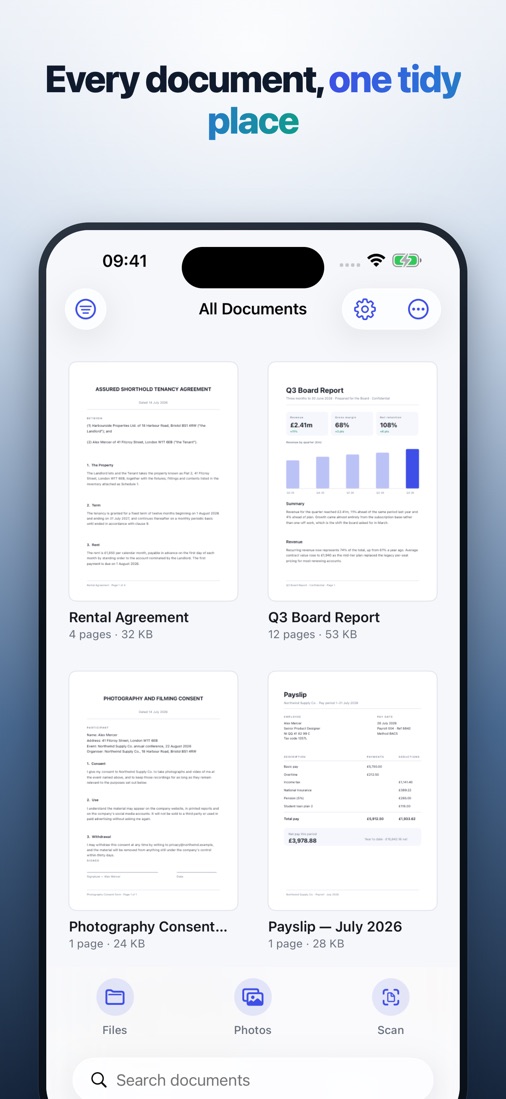
AIPDF scans paper into crisp, searchable PDFs, then lets you annotate, sign, merge, split, compress and password-protect them. Everything runs on your device — no account, no server, no upload.
Download on the App Storefree to tryiPhone · iPad · Mac · 100% on-device · No account, no tracking
What it does
Everything you need, nothing you don't.
Scan paper into a real PDF
On iPhone and iPad, the camera finds the page edges, straightens the shot and applies colour, greyscale or high-contrast filters. Keep shooting and every page lands in the same file.
On-device text recognition
OCR reads a photographed page into real, searchable, selectable text using Apple's Vision framework. The "AI" here is on-device document detection and text recognition — there is no generative AI and no server.
Annotate and mark up
Highlight, underline, strike through, draw freehand, add arrows, shapes and sticky notes — free, with no time limit.
Sign and fill forms
Draw your signature once, then drop it on any document with a tap. Fill form fields and tick boxes without printing a thing.
Merge, split, compress
Combine several PDFs, split a long one, reorder, rotate, delete or extract pages, and shrink a heavy file so it fits an email limit.
Lock and unlock
Add, change or remove a password on documents you own — the file is encrypted on your device, and no password ever leaves it.
How it works
Bring in a document
Scan a printed page with the camera on iPhone or iPad, or import a PDF, photo or file — on Mac you import from Photos and the file system.
Work on it
Annotate, sign, run OCR, reorder pages, merge, split, compress or convert.
Share or lock it
Export from the share sheet, or add a password first. The original never leaves your device unless you send it.
AIPDF FAQ
Straight answers about price, devices and privacy.
What is free in AIPDF, and what needs Pro?
Free forever: reading and searching unlimited PDFs, highlighting, underlining, strike-through, drawing and notes, tidying pages, and up to 3 scans per day. Pro unlocks unlimited scanning, OCR, signing and form filling, merge and split, compression, convert/export and password protection.
How much is AIPDF Pro?
$19.99 per month or $69.99 per year, each starting with a 3-day free trial. Prices are in US dollars; the paywall shows your local price before you confirm. One subscription covers iPhone, iPad and Mac.
Are my documents uploaded?
No. Scanning, OCR, annotation, merging, compression and password protection all run on your device. There is no account and no AIPDF server, so the app also works offline.
Can I scan on the Mac?
Camera scanning is on iPhone and iPad. The Mac version imports photos and files instead; every other tool works the same.
Can AIPDF edit the text inside a PDF?
No. It annotates, signs, fills form fields and reorganizes pages, but it does not rewrite existing text or images in a document.
Who makes AIPDF?
AIPDF is made by Sakura5, an independent app studio that builds focused, privacy-first apps for iPhone, iPad and Mac. Support: support@sakura5.app.
From the blog
Guides and tips related to AIPDF.

How to Scan Multiple Pages Into One PDF on iPhone
Scan multiple pages into one PDF on iPhone without ending up with ten separate files. A page-by-page workflow, the right filter, and how to fix page order.

How to Compress a PDF on iPhone to Send by Email
How to compress a PDF on iPhone so it fits an email attachment limit: why scans are so heavy, which quality setting to pick, and what to do if it won't shrink.

How to Fill Out a PDF Form on iPhone (and Sign It)
How to fill out a PDF form on iPhone without printing: typing into fields, ticking boxes, adding your signature, and flattening a copy so nobody can change it.

How to Make a Scanned PDF Searchable: 4 Ways Compared
How to make a scanned PDF searchable with OCR: four ways compared -- online converters, desktop software, Live Text and on-device OCR -- and how to check it worked.

How to Password Protect a PDF on iPhone: A Checklist
How to password protect a PDF on iPhone before you send it: open vs permissions passwords, strong passwords, metadata, and how to share the password safely.
Ready when you are
Get AIPDF on your iPhone today.
Download on the App StoreSupport · Privacy · Terms · More Sakura5 apps